
This document describes how get_pumf() turns a
Statistics Canada PUMF zip file into a lazy DuckDB-backed
dplyr::tbl(), covering every choice and fallback along the
way. The LFS has its own accumulating pipeline, described separately at
the end.
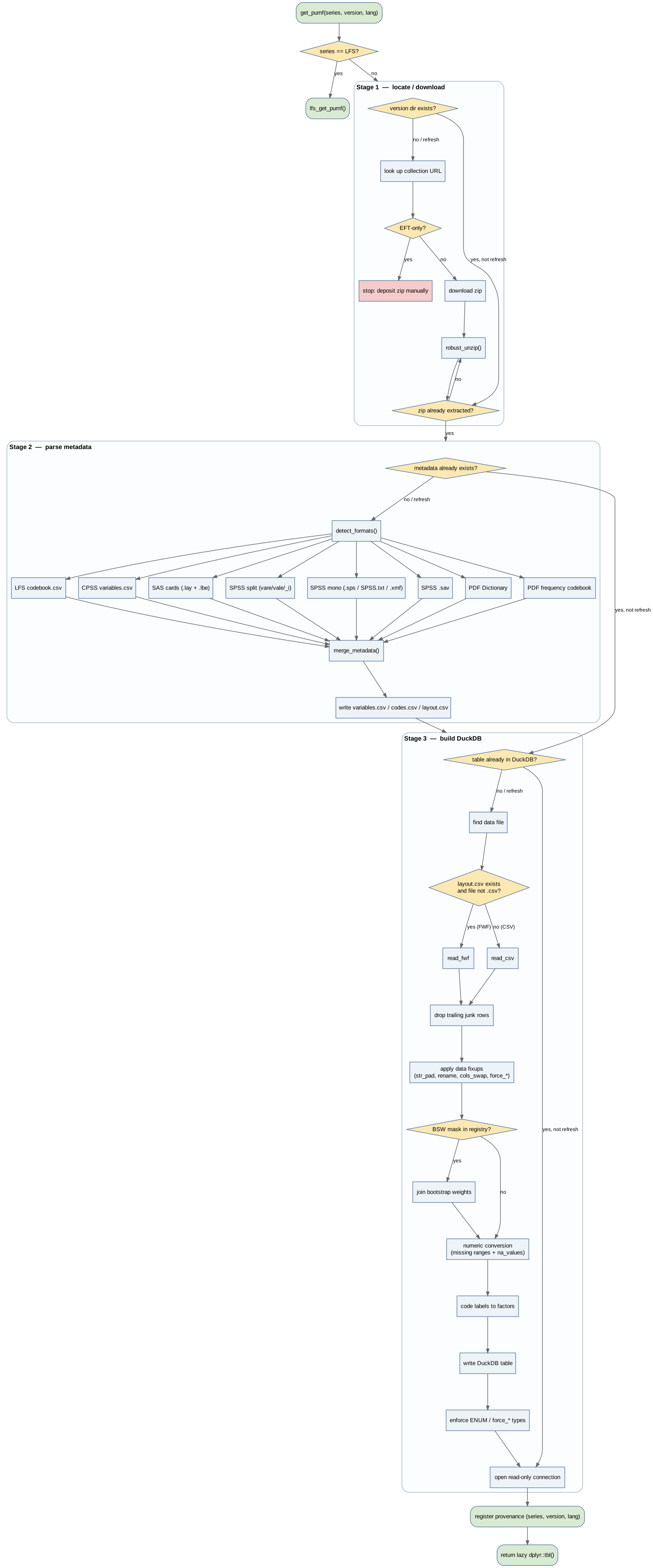
Stage 1 — Locate or download
pumf_locate_or_download() ensures the version directory
exists with extracted content before any parsing begins.
Cache layout:
<cache_path>/
  <series>/
    <version>/
      <original>.zip          # retained after extraction
      <extracted dirs>/
      metadata/               # written by Stage 2
      <series>_<version>.duckdb
Decision sequence:
refresh = TRUE— delete the.duckdbfile(s) andmetadata/subdirectory, leaving the zip and extracted content untouched. Stages 2 and 3 then re-run without re-downloading.redownload = TRUE— wipe the entire version directory first, then proceed as a first-time run. Impliesrefresh.Already extracted? —
version_is_extracted()returnsTRUEif any subdirectory (other thanmetadata/) or non-zip non-duckdb file is present. IfTRUE, the zip step is skipped even when the zip is still on disk.Download — the URL is looked up in
list_canpumf_collection(). Surveys distributed only via Statistics Canada’s EFT portal have the marker"(EFT)"instead of a URL; the function stops with instructions to deposit the zip manually.-
Extract —
robust_unzip()handles two edge cases:-
Naming collision: some zips contain a single top-level
directory with the same name as the archive
(e.g.
2025-CSV.zip/). The colliding directory is renamed to strip.zipbefore being moved into the version directory. -
Encoding: older StatCan zips store filenames without the
UTF-8 flag (General Purpose Bit Flag bit 11).
grep/subcalls on zip entry names useuseBytes = TRUEto avoid “invalid in this locale” warnings.
-
Naming collision: some zips contain a single top-level
directory with the same name as the archive
(e.g.
Version resolution
pumf_resolve_version() canonicalises Census version
strings before any registry lookup. Any string starting with a
four-digit year is parsed flexibly: the file type is detected by
grepping for "hierarchical", "household", or
"famil" (defaulting to "individuals"), and CMA
vs provincial by grepping for "cma". The registry is then
probed to determine the correct canonical format for that year.
Examples:
| User input | Resolved |
|---|---|
"2021" |
"2021 (individuals)" |
"1971" |
"1971/individuals_prov" |
"1971 CMA" |
"1971/individuals_cma" |
"1971 households CMA" |
"1971/households_cma" |
"1986 families" |
"1986/families" |
"2001 households" |
"2001 (households)" |
Stage 2 — Parse metadata
pumf_parse_metadata() converts raw SPSS/SAS command
files into three canonical CSVs. The function is idempotent: it does
nothing if metadata/variables.csv already exists and
refresh = FALSE.
Format detection
detect_formats() scans the entire version directory
recursively and identifies which parser(s) apply. Multiple
parsers can fire for the same survey (e.g. SPSS split for
layout/codes and SAS cards for BSW weights).
| Priority | Format | Detection rule |
|---|---|---|
| 1 | LFS codebook CSV | filename matches codebook\.csv (case-insensitive) |
| 2 | CPSS variables CSV | filename is exactly variables.csv
|
| 3 | SAS reading cards | directory contains both a .lay and a .lbe
file |
| 4 | SPSS split-file | any .sps file whose name ends in vare,
vale, or _i
|
| 5 | SPSS monolithic |
.sps file, *SPSS.txt file, or
.xmf file whose content contains VALUE LABELS
or DATA LIST (checked with
useBytes = TRUE to tolerate CP850/Latin-1 data);
VARIABLE LABELS is optional |
| 6 | SPSS .sav |
a .sav binary file readable by haven |
| 7 | PDF Data Dictionary |
*Dictionary.pdf present and pdftools
installed; supplements label-only surveys where the SPSS file has
DATA LIST but no VARIABLE LABELS or
VALUE LABELS
|
| 8 | PDF frequency codebook | a bilingual StatCan frequency codebook PDF (per-variable
Variable Name: / Answer Categories blocks)
under a Codebook/LivreDesCodes path,
content-verified; pdftools installed. A
last-resort fallback consulted only when no command
file or codebook CSV was found — recovers labels for surveys whose only
machine-readable companion is the data file (e.g. CPSS cycle 1) |
| 9 | PDF user-guide frequency dictionary | the data-dictionary appendix of a PUMF user guide
(Variable Name: X Position: N Length: L blocks with a
FREQ/WTD frequency table);
pdftools installed and
getOption("canpumf.pdf_crosscheck", TRUE). Shortlisted by
path pattern, capped at 8 files > 50 KB, and content-verified for ≥10
block headers and a FREQ column. Not a metadata
source — it feeds the label repair pass below, not
merge_metadata()
|
Detection for case 5 also searches for a parallel French file — any
candidate in the same set whose path includes /fran or
/french (case-insensitive).
Parsers
SPSS monolithic (parse_spss_mono)
Handles the single-file SPSS format used by Census (2001–2021), SFS
1999, SHS, and others. The file typically contains
DATA LIST, VARIABLE LABELS,
VALUE LABELS, and sometimes MISSING VALUES and
FORMATS sections. VARIABLE LABELS is optional
(e.g. Census 2011 individuals omits it). Older releases like SFS 1999
have only DATA LIST with no label sections at all — these
produce a fully importable table with raw codes but no human-readable
factor levels.
Key parsing details:
Column ranges —
DATA LISTranges may have spaces on either side of the dash (129-135,129 - 135, or129- 135). All three are normalised by the regex(\\d+)\\s*-\\s*(\\d+)before tokenisation.Record-group marker — a leading
/on the first variable line (e.g./PROVP 1-2) is stripped, not discarded, so the variable is retained.Section terminator — the
DATA LISTsection ends at the first blank line,.line, or occurrence ofVARIABLE LABELS,VALUE LABELS,MISSING VALUES,FORMATS, orEXECUTEat the start of a line. The keyword check is the reliable terminator for older files (e.g. 1991 XMF) that have no blank line betweenDATA LISTandVARIABLE LABELS.DATA LIST type annotations — the
(A)suffix after a column range marks a character-type variable. The parser records anis_charflag per column and uses it to populatevariables.csvtypes when noVARIABLE LABELSsection is present.Sentinel detection — variables whose only VALUE LABELS are sentinel phrases (“Not applicable”, “Valid skip”, “Don’t know”, “Data not available”, etc.) are classified as
numericwith amissing_low/missing_highrange, not ascharacter. This prevents spurious NA warnings when numeric values fall outside the label set.Zero-padded codes — unquoted SPSS numeric codes like
01,02are normalised viaas.numeric()→as.character()so they match bare integer values in CSV data.Multi-variable VALUE LABELS blocks —
/VAR1 VAR2 VAR3headers (possibly spanning continuation lines) are fully parsed so all listed variables receive the code/label pairs.
SPSS split-file (parse_spss_split)
Used by SFS, CPSS, and similar surveys that ship separate files for
variable labels (*vare.sps), value labels
(*vale.sps), missing values (*miss.sps), and
layout (*_i.sps). The layout_mask from the
registry disambiguates when a single directory holds multiple sets
(e.g. individual vs. household files).
SAS reading cards (parse_sas_cards)
.lay files supply the fixed-width column positions;
.lbe files supply the value labels in
PROC FORMAT syntax. Variable labels come from a companion
.sas file if present. This parser reuses
parse_spss_split’s layout parser since the
.lay format is identical.
LFS codebook CSV (parse_lfs_codebook)
The LFS ships a single *codebook.csv with one row per
code value. Columns are always read as CP1252 regardless of the
metadata_encoding registry field.
CPSS variables CSV (parse_cpss_csv)
The Canadian Perspectives Survey Series ships a
variables.csv with variable metadata only; no layout or
codes. The encoding defaults to Latin-1 (CP1252 if the registry
overrides).
SPSS .sav (parse_spss_sav)
Haven is used for binary .sav files when no text-format
command file is available. This is a fallback for surveys that do not
ship SPSS syntax.
PDF Data Dictionary (parse_pdf_dictionary)
StatCan PDF Data Dictionaries follow a standard bilingual format.
Variable blocks start with
<name> Position: N Character/Numeric(w). The parser
extracts variable long-names (Long name: /
Long nom:) and code-value labels (Codes: /
Domaine:). Reserved codes (Reserved Codes: /
Codes Réservés:) set missing_low/missing_high
ranges.
This parser produces only variables and
codes (no layout), and fires only when
pdftools is installed and a matching
*Dictionary.pdf is found. It is used as a label-only
supplement for surveys like SFS 1999 where the SPSS file is
DATA LIST-only.
PDF frequency codebook (parse_pdf_codebook)
A second, distinct StatCan PDF layout, used when a survey ships
no machine-readable command file or codebook CSV — only a
bilingual frequency codebook PDF. Variable blocks start with
Variable Name: / Nom de la variable : and
carry the label on the Concept: line; an
Answer Categories / Catégories de réponse
frequency table supplies the value labels (parsed from a right-anchored
code-row regex that tolerates comma- and space-grouped counts and
rejoins wrapped answer text). Produces only variables and
codes. Like the dictionary parser it requires
pdftools, but detection is a fallback of last
resort — only consulted when no command file or codebook CSV
was found, and only for PDFs under a
Codebook/LivreDesCodes path that
content-verify for the Variable Name: +
Answer Categories signature. This is what gives CPSS cycle
1 (the only cycle without a variables.csv) full bilingual
labels.
PDF user-guide frequency dictionary
(parse_pdf_freq_codebook)
A third StatCan PDF layout: the data-dictionary appendix of
a PUMF user guide (GSS cycles, SGVP, PALS, SFS, Time Use). Blocks open
with Variable Name: X Position: N Length: L — the
required Position is what separates this layout from the
codebook above — followed by a free-text label and a right-aligned
FREQ/WTD (French
FREQ/POND) frequency table. Continuous
variables print a single lo : hi range row instead of
per-value rows.
Beyond the usual variables/codes this
parser also returns freqs and ranges, and
every table carries a block id — one user guide documents
each linked module in turn, so a shared key such as RECID
gets one block per module and the blocks are told apart by matching
their printed positions against layout.csv.
Unlike parsers 1–8 this one is deliberately excluded from
merge_metadata(), so the command file stays
authoritative. It becomes a primary source only if no other parser fired
at all. Its real job is the cross-check below.
Metadata encoding
The registry metadata_encoding field sets the encoding
for all text-format parsers. Default is "CP1252" (a
superset of Latin-1 that correctly decodes Windows-era en-dashes and
curly quotes). Exceptions:
| Surveys | Encoding | Reason |
|---|---|---|
| Census 2021, 2021 hierarchical | "UTF-8" |
Command files shipped as UTF-8 |
| Census 1991 (individuals) | "CP850" |
DOS-era IBM Code Page 850 |
| SHS 2017, 2019 | "UTF-8" |
Their reading cards are UTF-8 where SHS 2021/2023 are not, so the default turned every accented French label into mojibake |
Merge
merge_metadata() takes the list of parser outputs and
produces a single list(variables, codes, layout). Conflicts
are resolved: later parsers win on duplicate variable names. If a layout
is present in only some parsers, the function checks that every variable
with a layout entry also appears in variables, stopping
with a diagnostic otherwise.
The final result is written to:
-
metadata/variables.csv— one row per variable (name, label_en, label_fr, type, decimals, missing_low, missing_high) -
metadata/codes.csv— one row per code value (name, val, label_en, label_fr) -
metadata/layout.csv— one row per fixed-width column (name, start, end); absent for CSV-format surveys
PDF cross-check and label repair
StatCan’s command files routinely ship truncated value and variable labels — hard cuts at a fixed width, dropped leading text, dropped interior text. The damage is upstream of the flavour-specific renderers (SAS, SPSS and Stata carry byte-identical text), so it cannot be dodged by parsing a different flavour. The same survey’s user guide carries the full text, typeset from the metadata before the command files were generated.
Trusting a PDF scrape over a machine-readable command file would
normally be a bad trade. What makes it a good one here is that this PDF
layout prints the frequency of every code, so the parse
can be reconciled against the actual data file before any of it is
believed. .pumf_pdf_crosscheck() runs at the end of
pumf_parse_metadata(), after
merge_metadata():
-
Choose the guide. A release that ships both an
original and a revised user guide has two candidates with near-identical
block counts describing different field positions; each
candidate’s
Position:/Length:headers are scored againstlayout.csvand the best-scoring one wins per language. PALS 2006’s pre-revision guide scores 3/746, the Dec 2011 revision 746/746. -
Validate against the data. Every documented
variable is tabulated in the microdata and the counts compared, giving
each block a status:
validated,continuous,mismatch, orunchecked(no data file, variable not in this module, file > 500 MB, or a printed count the parser could not read). Written tometadata/pdf_validation.csv. - Decide whether the guide describes this file at all. That is a question about the document, not about any one variable, and there are two independent channels: do the printed counts reproduce a tabulation of the data, and do the printed positions reproduce the command file’s layout. Both failing means the wrong document — the repair ledger is written empty and nothing downstream reads divergences off a rejected guide. Frequencies failing while positions pass means the right document with a different tabulation base: PALS 2006’s frequencies are computed over the disability sub-population, so no count matches even though all 746 positions do.
-
Compare every label and record
fill,repair,flagorokinmetadata/label_repairs.csv, each row carrying the variable’s validation status so uncorroborated repairs stay visible. A repair is withheld only on an outrightmismatch— a variable the frequency check could not reach is not evidence against the parse.
A label is replaced only when the guide’s text demonstrably extends the command file’s and the command file shows the fingerprint of damage. That second test matters because a guide’s text being longer has two causes and only one of them is damage: some guides print the full question wording where the command file gives a hand-written short label, and the abbreviation is often a subsequence of the question, so the shape test alone would “repair” a perfectly good label into a question.
Three signals separate them:
-
A derived truncation ceiling. A hard cut leaves a
spike of labels at a fixed width; a hand-abbreviated set thins out
towards its longest entry. The ceiling is computed per survey and per
label field from the command file itself — there is no constant 60
anywhere in the implementation — and returns
NAwhere there is no ceiling. - A strict-suffix test for the other damage pattern, dropped leading text, which leaves a short label well below any ceiling.
-
An annotation veto that outranks both, and looks at
the dropped text rather than at what survived. StatCan’s guides
write editorial notes and scraped field furniture as
Key: value, while text lost to truncation is running prose — so a colon in the dropped text means this is not damage.
Codes the guide documents but the command file never declared are
reported, not injected: that is a registry
codes_supplement decision.
The whole step is skipped when pdftools is not
installed, and can be turned off with
options(canpumf.pdf_crosscheck = FALSE). Both side-car CSVs
are exposed to users by pumf_label_repairs() and
pumf_freq_validation().
Stage 3 — Build DuckDB
pumf_build_duckdb() reads the canonical CSVs from
metadata/, reads the raw data file, applies
transformations, and writes a .duckdb file. The function
skips the build if the target table already exists and
refresh = FALSE.
Data file selection
find_pumf_data_file() searches the version directory
recursively.
Extension pre-filter — derived from the registry
file_mask:
file_mask ends in |
Pre-filter |
|---|---|
.csv |
only files matching \.csv$
|
.txt or .dat
|
only files matching \.(txt\|dat)$
|
other / unusual (e.g. .INDIV) |
all files (relies on file_mask alone) |
| absent + layout exists |
\.(txt\|dat)$ (FWF inferred from layout) |
| absent + no layout | \.csv$ |
Several subdirectories are always excluded from the search:
metadata/, SPSS/, Command/,
Syntax/, Layout/, SpssCard/,
Reading_cards/, Documents/. Bootstrap weight
(_BSW.) files are also excluded; they are handled
separately.
When multiple candidates survive, the file_mask regex
narrows the list. If more than one still remains, the function stops
with a message listing the ambiguous files and asks to set
file_mask in the registry.
FWF vs. CSV
After the data file is identified:
-
FWF when
metadata/layout.csvexists and the data file does not end in.csv. This handles the edge case (e.g. CHS) where the SPSS DATA LIST produces a layout but the actual data ships as CSV. - CSV otherwise.
Both paths read all columns as character
(col_types = cols(.default = "c")) to preserve leading
zeros and avoid premature type coercion. Numeric conversion happens
explicitly in the next step.
Trailing junk row removal (FWF only)
After reading a fixed-width file, any row where fewer than two
columns are non-NA is dropped. FWF files from older StatCan archives
often end with \r\n\x1a (a DOS EOF marker), which the FWF
reader interprets as a one-character row with a single non-NA field;
this step removes it silently. CSV files are not affected — CSV parsers
handle trailing newlines correctly.
Data fixups (pre-label)
Registry data_fixups entries are applied to the raw
character data before label mapping:
-
str_pad— left- or right-pad specified columns to a target width. Used to zero-pad codes that arrive without leading zeros in some CSV formats (e.g. SFS). -
rename— rename a column; applied only when the old name is present (safe for surveys that ship in multiple release variants, e.g. Census 2021 RELIG/RELIGION_DER). -
cols_swap— named character vectorc(A = "B", C = "D")swapping pairs of column names. Used for surveys where the DATA LIST variable names are transposed relative to the PDF documentation (e.g. WKACTMA/WKACTFA and FAOCC81/MAOCC81 in Census 1981 individuals). -
force_numeric— character vector of column names to treat as numeric regardless of how many VALUE LABELS are declared. Used when a variable carries boundary or top-code labels (e.g."85 years and over") alongside otherwise-continuous values, or is an integer index the SPSS file mis-classifies as categorical (e.g. SUBSAMPL in Census 1971). The codes are dropped, but any true-missing sentinel codes (Not stated, Don’t know, Valid skip, … — not zero-value labels like “None”) are first converted into a per-variablemissing_low/missing_highrange so those sentinels still becomeNA. An existing missing range (fromMISSING VALUESor a split-SPSS miss file) takes precedence. -
force_character/force_integer/force_bigint— character vectors of variable names whose DuckDB storage type is overridden. Unlike the conversions above, the raw string values are kept verbatim (no numeric conversion, no code labeling), so geographic codes retain leading zeros and out-of-int-range IDs survive.force_characterkeeps the column VARCHAR;force_integer/force_bigintcast it to INTEGER / BIGINT viaALTER COLUMNafter the table is written (an INTEGER cast that overflows 2^31 errors — useforce_bigint). A variable may appear in at most oneforce_*set (includingforce_numeric); this is validated at build time. LFS sources itsSURVYEAR/SURVMNTH/REC_NUMinteger-forcing through this mechanism from the shared LFS registry entry. -
codes_supplement— named list ofdata.frames injecting code-label rows absent from the SPSS command files (values present in the data but not declared in the command files, e.g. the CHSPPROVterritories code). Each data frame has columnsval,label_en,label_fr. Settinglabel_en = NAmarks a value as intentionally missing (produces a silentNAfactor entry without a warning, and without introducing a spurious factor level). All entries are verified in the override ledger (tests/testthat/override_verification.csv). -
na_values— character vector of raw string sentinels that becomeNA. In numeric columns they are exact-matched and NA’d during numeric conversion; in labeled (factor) columns they are silently blanked. Used for undeclared Census income sentinels and SAS-style"."missing markers. -
labels_supplement— named listc(VAR = c(label_en =, label_fr =))supplying variable labels the source metadata leaves blank (e.g. CPSS 1 ships only a PDF codebook whose weight variableCOVID_WThas an emptyConcept:line in both languages). Applied in both Stage 3 andlabel_pumf_columns()/pumf_var_labels(), and fills onlyNAlabels, so genuine source labels always win.
Bootstrap weight join (BSW)
When the registry has bsw_mask +
bsw_join_key + bsw_file_mask, the BSW file is
found, read (CSV or FWF), and left-joined onto the main data by the join
key before numeric conversion.
Numeric conversion
apply_numeric_conversion() converts character columns
typed "numeric" in variables.csv:
-
as.numeric()on the raw character values. -
Missing range — values in
[missing_low, missing_high]becomeNA. This handles SPSS-declaredMISSING VALUESblocks. -
na_valuesfixup — additional raw string sentinels from the registry (data_fixups$na_values) are set toNAviatrimws(raw) %in% na_values. Used for undeclared income sentinels in older Census files.
The two mechanisms complement each other: the SPSS
MISSING VALUES block catches sentinels declared in the
command file; na_values catches those that StatCan omitted
from the command file but documents in the user guide.
Census income sentinel widths (confirmed from SPSS DATA LIST sections):
| Census years | Income field width | Sentinels (na_values) |
|---|---|---|
| 2016, 2021 | 8 chars |
"99999999", "88888888"
|
| 1991–2011 | 7 chars |
"9999999", "8888888"
|
| 1986 and earlier | unverified | none applied |
The two sets are kept separate: applying the 7-digit sentinel to an
8-char field would incorrectly NA out a valid $9,999,999 income value
(stored as " 9999999" which trims to
"9999999").
Code labels → factors
apply_code_labels() maps raw character values to R
factors using codes.csv. The factor levels are the complete
ordered set from the codes table, not just the values present in the
data.
Unmatched raw values become NA with a warning showing
the first five offending values. An exception is made for values that
appear in codes.csv with label_en = NA
(injected via codes_supplement): these are treated as
intentionally NA and silently produce NA factor
entries without a warning.
When lang = "fra", any missing French label falls back
per-row to the English label.
DuckDB write and ENUM enforcement
The labelled data frame is written to DuckDB with
dbWriteTable(). Factor columns are stored as DuckDB
ENUM types. DuckDB >= 1.5.2 does this automatically; for
older versions ensure_enum_columns() runs
ALTER TABLE ... ALTER COLUMN ... TYPE ENUM(...) for each
factor column.
A separate DuckDB table is created per language (table names
eng and fra, or
eng_<layout_mask> for surveys with multiple file
types). The write connection is shut down before
pumf_open_duckdb() re-opens the file in read-only mode,
preventing in-process lock conflicts when building both language tables
in the same session.
Multi-module surveys
Some surveys ship several linked files that share a respondent key
and are meant to be joined for analysis (GSS cycle 16 / Aging and Social
Support 2002, the GSS Time Use cycles, the Survey of Household Spending
2017, the Giving/Volunteering/ Participating cycles).
canpumf models these as several tables inside one
DuckDB file — not separate databases, which could not be joined
on a single connection.
A registry entry declares
modules = list(MAIN = ..., CG4 = ...); each module carries
its own layout_mask, file_mask,
data_fixups, and bootstrap-weight config. One module is the
primary (the respondent-level file that carries the
survey weight); its config is auto-derived to the entry’s top level so
all the single-table code paths above keep working unchanged. The entry
also records module_key — the shared key the modules join
on (it varies: RECID, PUMFID,
MICRO_ID, CASEID, IDNUM).
pumf_run_pipeline() loops the modules, running Stage 2
and Stage 3 once per module so every table lands in the
one DuckDB file. Each module parses its metadata into
metadata/<module>/ (the primary uses
metadata/) and joins its own bootstrap
weights, so e.g. the SHS Interview replicate weights are not mis-joined
onto the Diary table. The primary module’s tbl is returned.
User-facing, get_pumf() returns the primary module and
emits a one-time message listing the sibling modules;
pumf_module(tbl, "<module>") opens a sibling on the
same connection so the two are joinable. The dedicated
Working with multi-module PUMF
surveys vignette covers the user-facing workflow in full.
LFS pipeline
The LFS is handled by lfs_get_pumf() (delegated directly
from get_pumf() without going through
get_pumf_connection()). Instead of one DuckDB per version,
all LFS versions share a single
<cache_path>/LFS/LFS.duckdb with accumulating tables
lfs_eng and lfs_fra.
Key differences from the standard pipeline:
Schema evolution — when a new LFS version adds a variable absent from earlier versions, the column is added via
ALTER TABLE ADD COLUMN. When a variable changes type (e.g. VARCHAR → ENUM),ALTER COLUMN SET DATA TYPEis used.Annual supersedes monthly — if annual and monthly versions for the same year are both loaded, the annual version supersedes the monthly rows for that year.
Version tracking — a
lfs_versionstable in the shared DuckDB records which versions have been downloaded and parsed, sorefresh = "auto"downloads only new versions.Read-only fast path — when the requested version is already in the database,
lfs_get_pumf()opens only a read-only connection and returns immediately. No write lock is acquired unless new data actually needs to be written.get_pumf()return — when a specific version is requested, the function applies adplyr::filter()onSURVYEAR(andSURVMNTHfor monthly requests) over the full shared table. Callingget_pumf("LFS")without a version returns the unfiltered table.label_pumf_columns()for LFS — because the shared schema is the union of all loaded versions, variables introduced in later years (e.g.GENDERadded ~2020) are absent from older versions’variables.csv.label_pumf_columns()therefore reads and merges metadata from every loaded version directory in chronological order, with the most-recent label winning on conflicts.
Connection provenance registry
get_pumf() registers
(series, version, cache_path, lang) in a package-level
environment keyed by the DuckDB connection’s C++ external-pointer
address:
.pumf_con_registry  <- new.env(hash = TRUE, parent = emptyenv())
key = format(con@conn_ref)   # stable across R-level S4 copies
This key survives dplyr tbl transformations and
select()/filter() calls because those
operations do not create new connections.
label_pumf_columns() uses .pumf_lookup_con()
to retrieve the provenance; close_pumf() removes the entry
and disconnects.
This internal provenance registry is distinct from the
RStudio Connections pane. Whether the DuckDB connection
is advertised to that pane is controlled separately by the
register_connection argument to get_pumf()
(default getOption("canpumf.register_connection", TRUE));
set it to FALSE to keep the pane from being spammed when
opening and closing many connections programmatically.
Registry configuration
pumf_registry_lookup(series, version) returns a named
list that controls every per-survey choice in the pipeline. Surveys
without an entry use auto-detection with defaults (see
Newest-sibling inheritance below for the one exception).
| Field | Purpose | Default |
|---|---|---|
file_mask |
regex to select the data file |
NULL (auto) |
layout_mask |
SPSS file disambiguator for split-file surveys | NULL |
data_encoding |
encoding of the raw data file | "CP1252" |
metadata_encoding |
encoding of SPSS/SAS command files | "CP1252" |
bsw_mask |
layout_mask for BSW-specific SPSS files |
NULL |
bsw_file_mask |
filename pattern for the BSW data file | NULL |
bsw_join_key |
column(s) to join BSW onto the main data | NULL |
bsw_drop_cols |
BSW columns to drop before joining | character(0) |
data_fixups |
list of str_pad, rename,
cols_swap, force_numeric,
force_character, force_integer,
force_bigint, codes_supplement,
na_values, labels_supplement transforms |
list() |
missing_supplement |
named list of c(lo, hi) pairs — explicit missing-range
overrides for sentinels no generic pattern can classify
(e.g. non-integer sentinels like 999.5) |
NULL |
doc_mask |
regex applied to PDF filenames to filter a shared documentation
directory to the relevant file type
(e.g. "Family\|Familles" for 1986 Census families) |
NULL |
modules / module_key
|
for multi-module surveys: per-module config
(layout_mask, file_mask,
data_fixups, BSW) and the shared respondent key the modules
join on (see Multi-module surveys above) |
NULL |
Newest-sibling inheritance
Surveys without a registry entry normally fall back to pure
auto-detection, with one exception. When the requested version is a bare
four-digit year and the same series already has at least one other
year-keyed entry, pumf_registry_lookup() inherits the
configuration of the newest registered sibling whose year is <= the
requested year (or the oldest sibling if the requested year predates
them all). This lets a freshly released year deposited in the cache
reuse the prior year’s config — which works cleanly now that recent
file_masks use a generic \d{4} year
placeholder rather than a hard-coded year.
A message() fires once per session so the implicit reuse
is discoverable; a genuinely changed release (new file layout, codes, or
BSW join) still needs its own explicit entry. Inheritance is
skipped for multi-part versions (e.g. Census
2021 (individuals)) and for LFS, which has its own shared
registry entry.